

NAAA 365 App Adds New Ways to Connect and Share
The NAAA 365 App serves as NAAA’s official platform for all NAAA Board meetings, Ag Aviation Expo and more, keeping members connected to the latest updates, resources and opportunities year-round.
More than an event app, the NAAA 365 App offers features such as the Agricultural Aviation magazine, online searchable Member Directory and event schedules, while new tools make it easier for members to connect, communicate and promote their businesses.
In the app, NAAA is introducing Forums, where members can ask questions, share ideas and connect with others in the agricultural aviation industry. Discussion topics will include upcoming NAAA events, safety, equipment, business operations and other industry-related subjects. Forums act similar to social media discussion groups, but allow for more privacy being in the App.
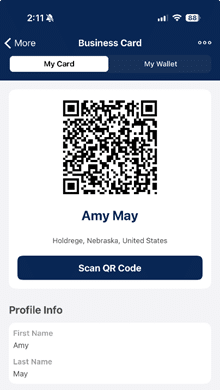
The new QR Business Card feature provides a convenient way to share and save contact and business information in one place. Instead of carrying traditional business cards, app users can share their digital card with others by simply scanning their QR code. Whether you’re at the Ag Aviation Expo, a Board meeting or another industry event, your business information is always available right from your phone.
The NAAA 365 App provides year-round access to important meeting and event information, including:
- Board and committee members can access meeting agendas and schedules.
- Ag Aviation Expo information, including the Trade Show map, exhibitor list, CEUs, auction items and sponsor listings supporting NAAA and the aerial application industry.
- Full event agendas with session details and locations. Tap “Events” at the bottom of the app and select your Expo or Board meeting.
- Personal scheduling through the “Agenda” tab. View all agenda items or create your own personal calendar by clicking the “+” next to sessions you plan to attend.
- Push notifications about networking opportunities, schedule changes and breaking news sent directly to your device.
- Agricultural Aviation magazine and online searchable Member Directory.
- Advertising opportunities are available on the App. Contact Lindsay Barber.
From the Apple App Store or Google Play, download the NAAA 365 App and follow the setup instructions. Use your NAAA website credentials as your login and passcode. Be sure to select the blue circle🔵 button below “preferred address.”
If you have questions about the NAAA 365 App, check out the App User Guide or contact Amy May.
Download the app, update your profile and start exploring the new ways to connect with NAAA members and others in the industry!